
In Raven Pro Web, unwanted tax returns aren’t deleted but are deactivated. A return can be deactivated if its status is “In Progress”. A return that’s been marked Complete cannot be deactivated.
To deactivate a tax return in ProWeb, follow these steps:
- From your office Welcome Page select Client Search
- Locate the client’s return in the list and click their Tools drop down menu:
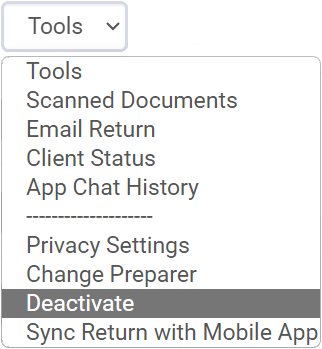
- Select Deactivate, then change No to Yes when asked to confirm deactivation.
A deactivated return remains in the client list with a status of “Deactivated”, and it can be reactivated if desired.
Caveats:
- For Pay-Per-Return subscribers, each deactivated return counts toward your initially purchased 15 returns. Please ensure you are required to deactivate prior to doing so.
- An In-Progress Return with an accepted extension request cannot be deactivated.
Additional Information:
Raven Pro Cloud: How to Remove / Delete a State Return
Raven Pro Cloud: Reactivating A Deactivated Return
Raven Pro Cloud: Pay-Per-Return FAQ